State:Closed|icon_bug|database:public|icon_mari|Resolution:Works For Me|TargetRelease:3.3v1|BugID:248505|
Problem summary
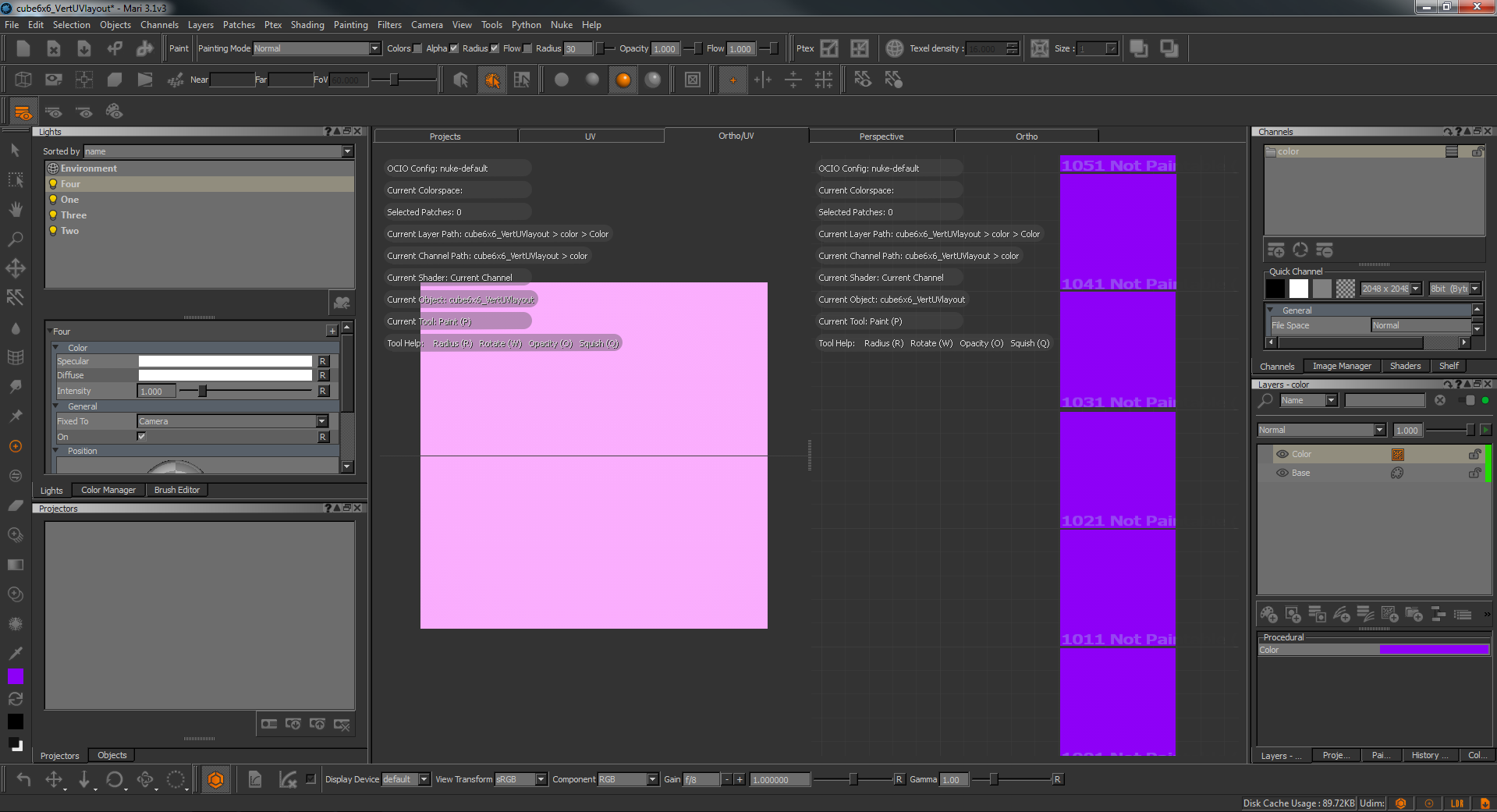
When Mari's native lights are attached to camera and camera views are toggled, the intensity of the lights creates permanent blown out colour.
Customer reported version
3.1v3 Customer reported platform
Linux Fedora
Steps to reproduce
1) Create a fresh project in Mari.
2) Import any model into the project.
3) Create a procedural 'color' layer and fill with solid colour (purple seems to have the most noticeable affects).
4) Change all four default Mari lights in the lights panel to be fixed to camera instead of scene. Lights > General > Fixed to [camera].
5) Change the viewer to 'Ortho/UV'.
6) Rapidly switch between camera viewpoints in the orthographic window via hotkeys.
7) Observe the intensity of the colour change as though the lighting has burnt into the model. (Purple to hot pink)
8) Change between flat shaded mode and shaded to see that the colour value has not changed.
Workaround
At the moment we can only suggest turning down the intensity of the lights on the model or fixing them back to scene rather than camera.
Alternatively, this issue does not occur in 3.2v1.
Reproduced by support
Reproduced on both Windows 7 and MacOSx (Sierra 10.12).
Mari 2.6v5, 3.1v1, 3.1v3
Expected behaviour
Expect Mari to toggle between camera views whilst retaining the correct colour information on the model.
Actual behaviour
The lighting seems to increase in intensity although all sliders remain at 1.00. The colour appears blown out and do not visually match between orthographic and UV view. The value of the colour does not actually change and from then on, any layer created before or after will contain the hot spot, even if the original 'color' layer is deleted.