State:New|TargetRelease:No Target|icon_bug|database:public|icon_mari|Resolution:Fixed|BugID:349976|
Search in
Please sign in to access the Bug Tracker
Problem summary
Registering a custom node to the Projection folder does not update the Layerstack menu
Customer reported version
4.0v4
Customer reported platform
Multiple
Steps to reproduce
1) Launch Example Head
2) Register the attached custom node to the Projection menu via the Python Console
mari.gl_render.registerCustomNodeFromXMLFile("/Projection/nodename", "/path/to/node.xml")
3) In the Node Graph, right click and navigate to Nodes > Projection to observe that your node has been added to the Projection folder.
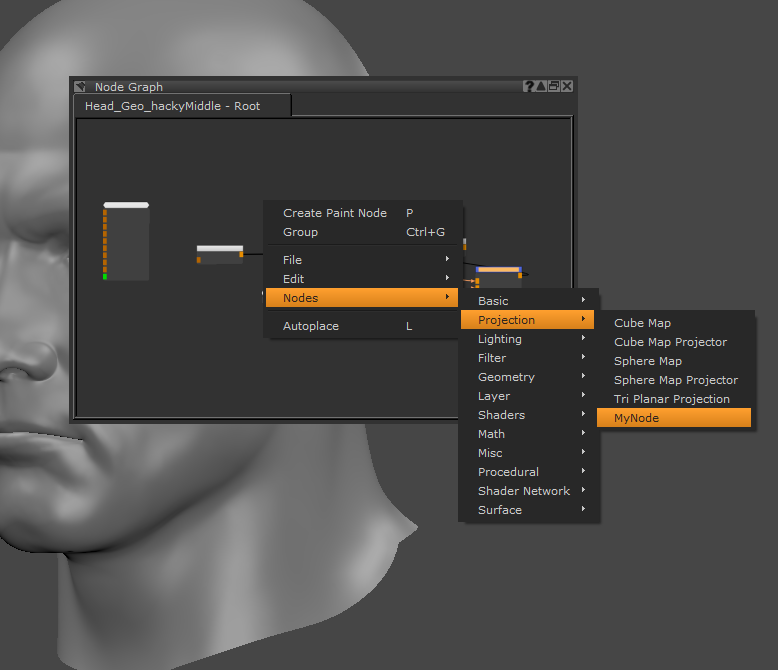
4) In the Layers palette > Add Procedural Layer > Projection. Notice that your node has not been added.
5) When you register a node to any other folder such as /Procedural/ this method works as expected.
Workaround
Unknown.
Reproduced by support
4.0v4 - Win 7, CentOS 7
4.0v1
3.3v1 - Win 7, CentOS 7, OSX 10.12.6
3.2v1 - Win 7, CentOS 7, OSX 10.12.6
Unable to reproduce bug in:
3.1v3 - /Environment/ works as expected
Earliest version tested
Mari 3.1v3 - last working version prior to renaming the Environment>Projection folder
Expected behaviour
Node should register in both NodeGraph and Procedural Layer menu locations
Actual behaviour
The Node was only registered in the NodeGraph's node list
We're sorry to hear that
Please tell us why