State:New|TargetRelease:No Target|icon_bug|icon_nuke|database:public|Resolution:Fixed|BugID:339261|
Search in
Please sign in to access the Bug Tracker
Problem summary
When creating a CDL soft effect, the 'export grade as .cc' returns an argument error instead of spawning a dialog
Customer reported version
Hiero 11.0v3
Customer reported platform
windows10
Steps to reproduce
1) Open a project or create a new sequence in Hiero
2) In the timeline, right click on a track item > Effects > CDL Effect
3) In the OCIOCDLTransform properties bin, adjust the settings as desired
4) Click 'Export grade as .CC'
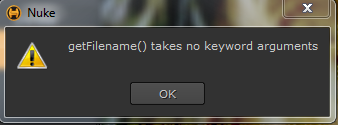
5) Observe that the following error is returned
Workaround
Unknown.
Reproduced by support
This bug has been reproduced in:
Hiero 11.1v2 - Windows 7, OS X 10.12.6, CentOS 7
Hiero 11.0v3
Hiero 11.0v1
Hiero 10.5v7
Hiero 10.5v1
Hiero 10.0v6
Hiero 10.0v1
Hiero 9.0v9
Hiero 9.0v1 - Windows 7, OS X 10.12.6, CentOS 7
Unable to reproduce bug in:
NukeStudio - Issue does not occur
Hiero 1.8v2 - Feature did not exist
Earliest version tested
Hiero 1.8v2 - Feature did not exist
Expected behaviour
As in NukeStudio, selecting the 'export grade as .cc' should prompt a Color Correction Filename dialog to open.
Actual behaviour
An error is returned showing that that getFilename() takes no keyword arguments.
Traceback (most recent call last): File "<string>", line 1, in <module> File "C:/Program Files/Nuke11.0v3/plugins\ocionuke\cdl.py", line 164, in export_as_cc ccfilename = nuke.getFilename("Color Correction filename", pattern = "*.cc")TypeError: getFilename() takes no keyword argumentsWe're sorry to hear that
Please tell us why